 Showroom · Onboarding Automation
September onsite · San Antonio
Showroom · Onboarding Automation
Kyle's three buckets, 25 pain points. Click any row for the solution. Display numbers renumber as buckets change — the small grey ref never does, so quote that one.
| A1A1 | Activation is one group at a timeWaves |
EWC had 150 groups to flip at once, done individually. No bulk operation anywhere in the go-live path. | Multi-select plus one action panel — select across filters, then act on the whole set at once ② Group Operations page |
Design | FEBE |
L | |
| A2A2 | Every new group is configured by handWaves |
Attributes, collections, strategies and settings set one at a time — "most of what makes a wave expensive." | Bulk-add group custom attributes and assign the OU across a selection — one operation instead of one visit per group Group Operations page |
Design | FEBE |
L | |
| A3A3 | Billing is enabled per group, then re-keyed monthlyWaves |
Two touches per group, then hand re-keyed across three systems. Foxboro: 54 locations configured manually. 242 Stripe addresses hand-entered. | Bulk billing configuration — payment method, pricing and commitments set across a selection in one operation Group Operations page |
Design | BE |
M | |
| A4A4 | Card-on-file gates launch and nothing chases itPreferred Vendor Agreement |
TLE stalled for weeks waiting on a card nobody was asking for. | Capture the card during self-serve signup, before it can become a blocker ① Self-serve signup |
Design | FEBE |
M | |
| A5A5 | No reliable signal that a location signed upPreferred Vendor Agreement |
Discovery is accidental. EWC dropped 23 centres mid-flow. Picklr Bluffdale and Lehigh went live and nobody told them. | A team-scoped registration link, emailed to the location, so signup attaches to the right Team on arrival ① Self-serve signup |
Design | FEBE |
L | |
| A6A7 | Bulk-uploaded users land in a password resetBoth modes |
Invites suppressed because they can’t be scheduled; status invisible and not bulk-resendable. ~10 support tickets from one 540-user Victra import. 12+ "resend the invite" requests over 2.5 years. | A bulk Message Owners action — pick a template, send now or schedule it to fire with the wave Both front doors |
Design | BE |
L | |
| A7A10 | Group custom attributes need SFTP and one specific personWaves |
Changeable only via the SFTP transformer. CSMs cannot self-serve. Hits 100% of QSR brands on Franchise Hub. | In-product attribute editing, with bulk apply from the Group Operations page ② Group Operations page |
Design | FEBE |
M | |
| A8A14 | Hosting data is gathered piecemeal after submissionPreferred Vendor Agreement |
47 of 63 Picklr numbers came back "Unable to Host." ~$6,300 in goodwill credits, 25+ Twilio threads. The reason a wave desynchronizes. | One intake form that branches on how the number is acquired, checks host-ability before asking anything else, and captures the signer’s authority Both front doors |
Design | FEBE |
M | |
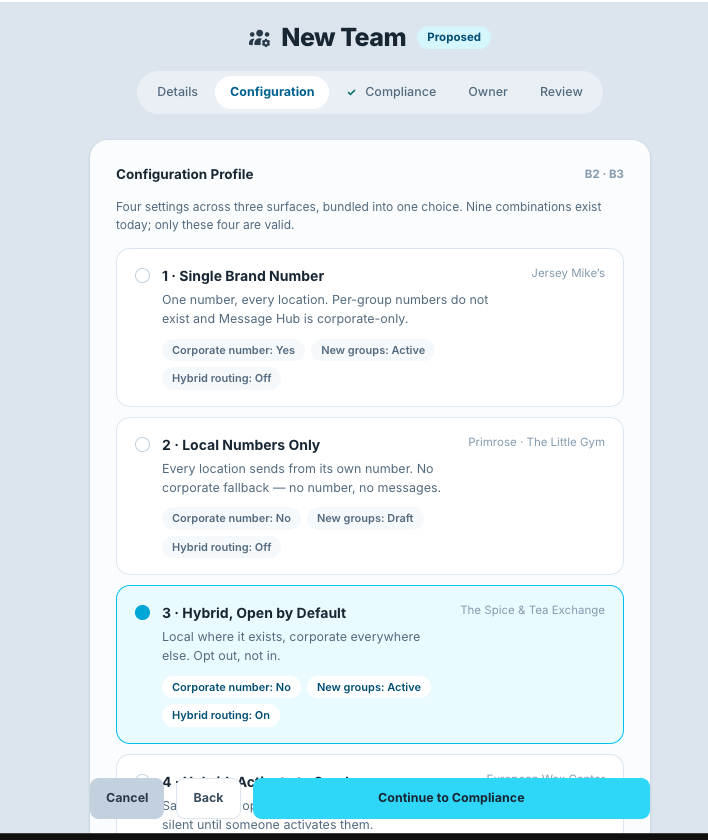
| A9B3 | Four settings across three surfaces govern how groups send |
Nine combinations, four valid. At least one production team currently holds an invalid combination. | Configuration Profile selector — pick one of four by name, and the settings follow Team creation checklist |
Design | FEBE |
L | |
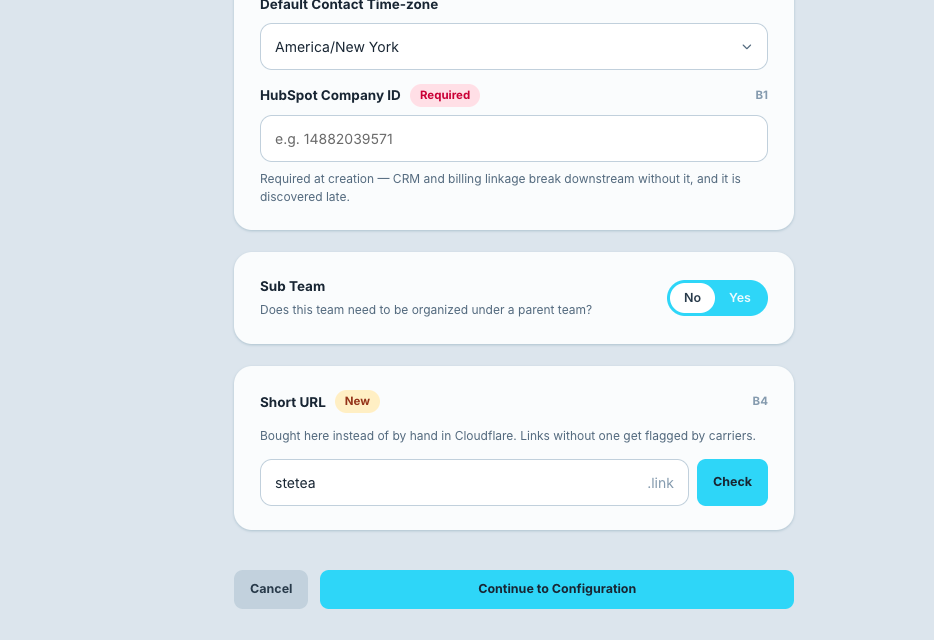
| A10B4 | Short URL is bought manually in Cloudflare |
Done via OnePass, easy to forget, and traffic gets flagged without one. "You just got to know you got to do that." | Search and buy in-product via the Cloudflare Registrar API Team creation checklist |
Design | FEBE |
M | |
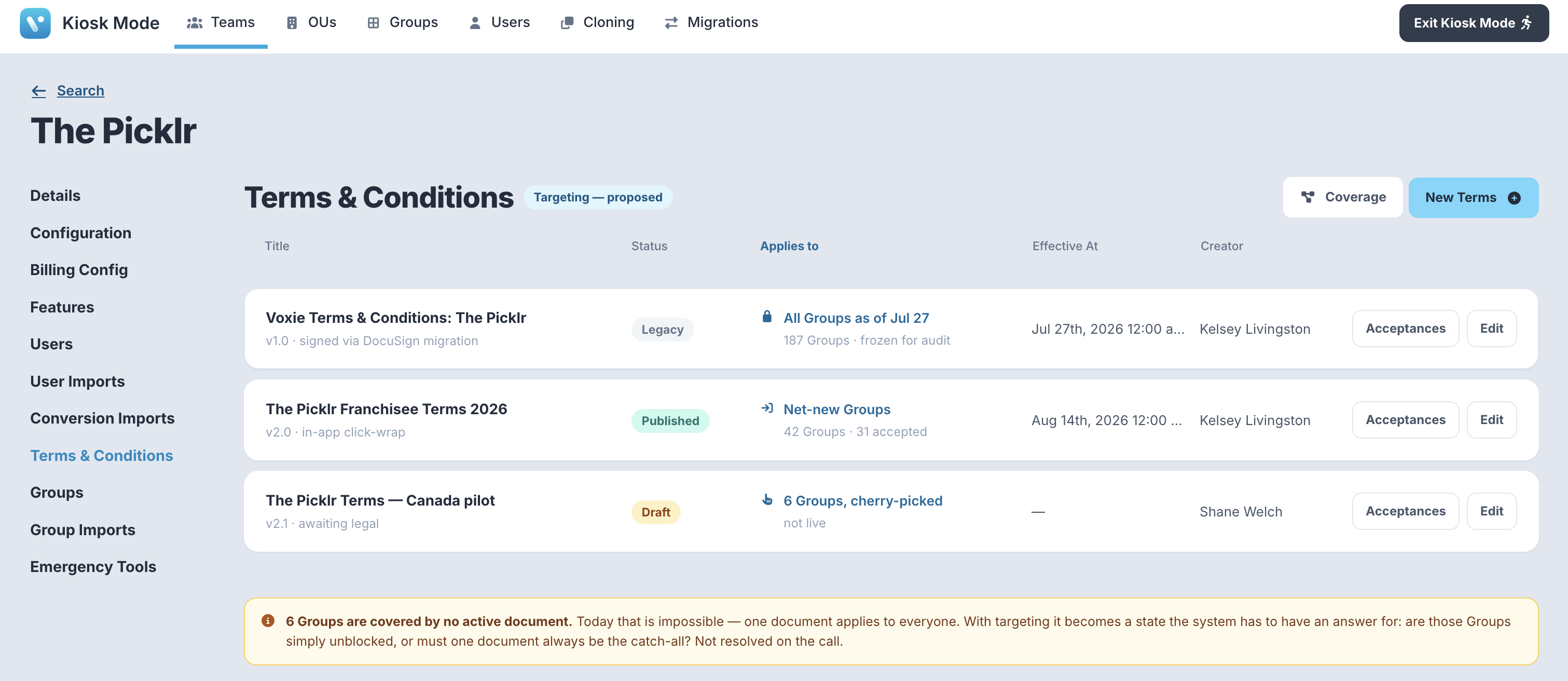
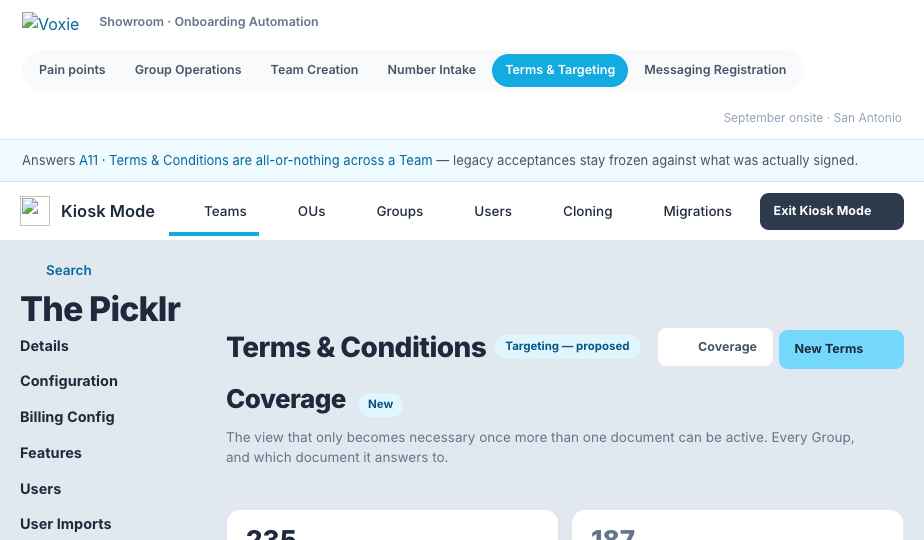
| A11A18 | Terms & Conditions are all-or-nothing across a TeamBoth modes |
One document applies to every Group. Primrose wants in-app signing for new owners without making hundreds of DocuSign signatories re-sign — and today there is no way to express that. | Let a document target a subset of Groups, and let more than one document be active at once — legacy acceptances stay frozen against what was actually signed Team creation checklist |
Clarify | FEBE |
L | |
| B1A9 | The T&C gate can freeze locations with no way outBoth modes |
~60 Picklr locations frozen because the master file held generic emails, not human owners. No admin kill switch, no "Not Accepted" export. | Kill switch plus export — and self-serve signup fixes the root cause Both front doors |
Done | FEBE |
S | |
| B2A11 | 50-group selection cap on collectionsWaves |
No paste-a-list. Makes TLE (450+), EWC (150 at a time) and Primrose (600) unworkable by hand. | Define collections by group custom attribute instead of a hand-picked list — an attribute-defined collection has no ceiling Group Operations page |
Build | FE |
S | |
| B3A13 | No welcome email, no go-live emailBoth modes |
Everything sent by hand, one location at a time: 18 byte-identical emails, 5 within 15 seconds. 11 launch notifications, 6 at the same timestamp. | Trigger Jean’s two templates on state change — both are already written Both front doors |
Build | BE |
S | |
| B4A15 | Nothing confirms a group is ready before it flips liveBoth modes |
Groups go live incomplete, and the failures are customer-visible. | A readiness check that gates the bulk activate, holding back incomplete groups with the reason each was held Group Operations page |
Build | FE |
M | |
| B5A16 | Onboarding state lives in six Google SheetsBoth modes |
Six trackers, hand-maintained per brand. Eight Notion pages exist only to say "go update the tracker." | The ops page retires them. One row per group, live, instead of six hand-maintained trackers Group Operations page |
Build | FE |
L | |
| B6B2 | Default group status on creation is a hidden team setting |
The root cause of the A1 status mess. Bulk import silently defaults every group to Active because of it. | Surface it at team creation, inside the configuration profile selector Team creation checklist |
Build | FE |
S | |
| B7A12 | Group status drives nothingWaves |
Enrolment into collections is manual, per group. Every activation needs a second manual step. | Deferred. Active auto-enrolling into collections changes how the platform behaves — that is Graham, and Aug 10 ruled it out of the sprint Onsite discussion |
Blocked | BE |
XL | |
| C1A6 | No fast way to check whether a group already existsPreferred Vendor Agreement |
Duplicates inflate group counts — and counts drive billing. Missed activations hide in the same gap. | The phone number is the duplicate key. The intake form looks it up in Voxie before the carrier check, so a duplicate is caught before the Group exists ① Self-serve signup |
Design | FEBE |
S | |
| C2B1 | HubSpot Company ID is optional at Team creation |
Breaks CRM and billing linkage downstream, and it is discovered late. | Required-field validation at team creation Team creation checklist |
Design | FE |
S | |
| C3B5 | Compliance automations aren’t seeded on new accounts |
Start/stop compliance automations are added by hand. One-time work, but forgotten. | Seeded as a Compliance step in New Team set-up, idempotent and visible until it runs New Team set-up |
Design | BE |
S | |
| C4B6 | Brand and campaign registration happen outside the skill |
~10 rejection events across 8 customers in 12 months, and we are losing Twilio FastTrack support. | Submit to TCR directly from Kiosk, with the Messaging Registration skill running inline as pre-validation — registration is per brand and one-off, so it is not blocked by the Bandwidth timeline Team creation checklist |
Design | FEBE |
XL | |
| C5B7 | Intelligent Inbox is not enabled by default |
Adoption reads near-zero, which turns into board questions. | Make AI enablement a default go-live step Team creation checklist |
Design | BE |
S | |
| C6A8 | Owner role is not supported in user import — and only Owners can enter payment detailsBoth modes |
Gates A3 and A4 entirely, which means it gates the whole self-serve front door. | Unblock Owner provisioning — the answer is needed before anything else is specced Blocks front door ① |
Blocked | BE |
S | |
| C7A17 | Training is coordinated and delivered per franchiseePreferred Vendor Agreement |
Caps how many locations can go live at once regardless of platform capability — "the real limiter on wave size." | Self-serve training signup in the same form. Delivery model goes to the CS session ① Self-serve signup |
Blocked | FEBE |
M |
Clickable, in real Voxie chrome. Each one gets its own page in this showroom.
EWC had 150 groups to flip at once, done individually. No bulk operation anywhere in the go-live path.
Do you want me to tell it? Individually.Kyle Daniel
Multi-select plus one action panel — select across filters, then act on the whole set at once
② Group Operations page
The wave front door. Corporate-paid batches, driven by an operator.
Kyle + Graham
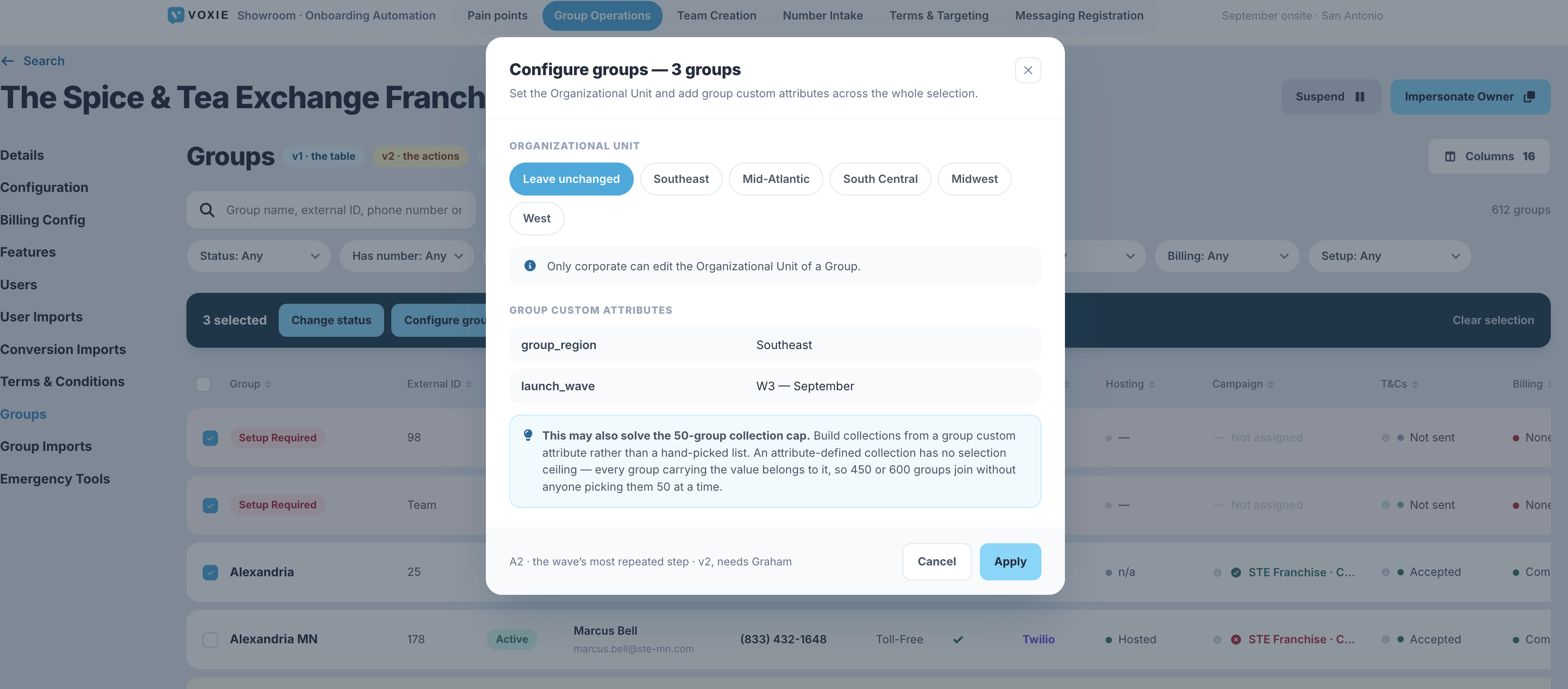
Attributes, collections, strategies and settings set one at a time — "most of what makes a wave expensive."
Configure this one like the others.The interaction Tim and Kyle keep describing
Bulk-add group custom attributes and assign the OU across a selection — one operation instead of one visit per group
Group Operations page
Attributes and OU are what make a group behave like its siblings.
Nothing outstanding — this one is ready to spec.
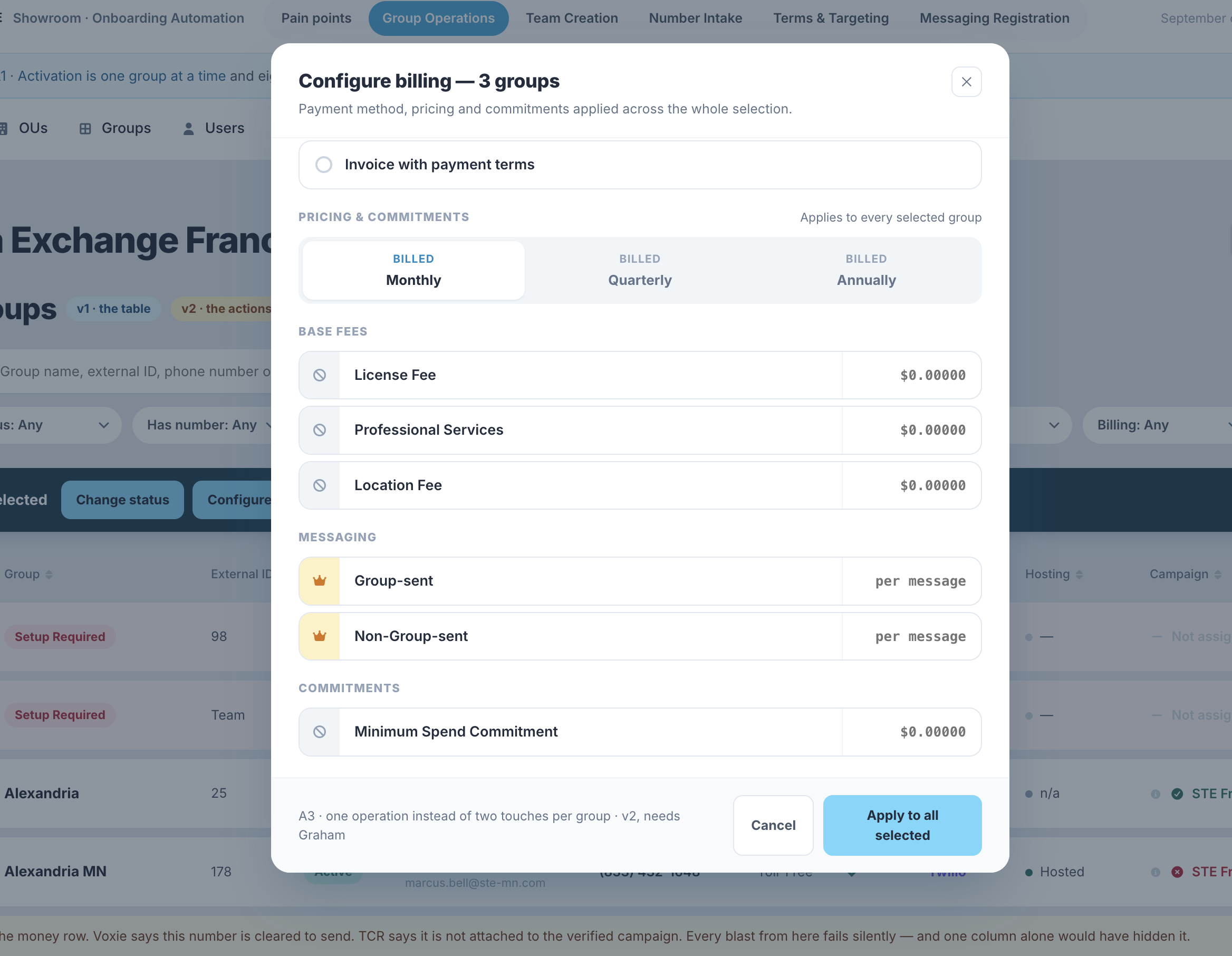
Two touches per group, then hand re-keyed across three systems. Foxboro: 54 locations configured manually. 242 Stripe addresses hand-entered.
Bulk billing configuration — payment method, pricing and commitments set across a selection in one operation
Group Operations page
Also the remediation tool for the EWC ~1,100-vs-97 billing-accuracy gap.
Nothing outstanding — this one is ready to spec.
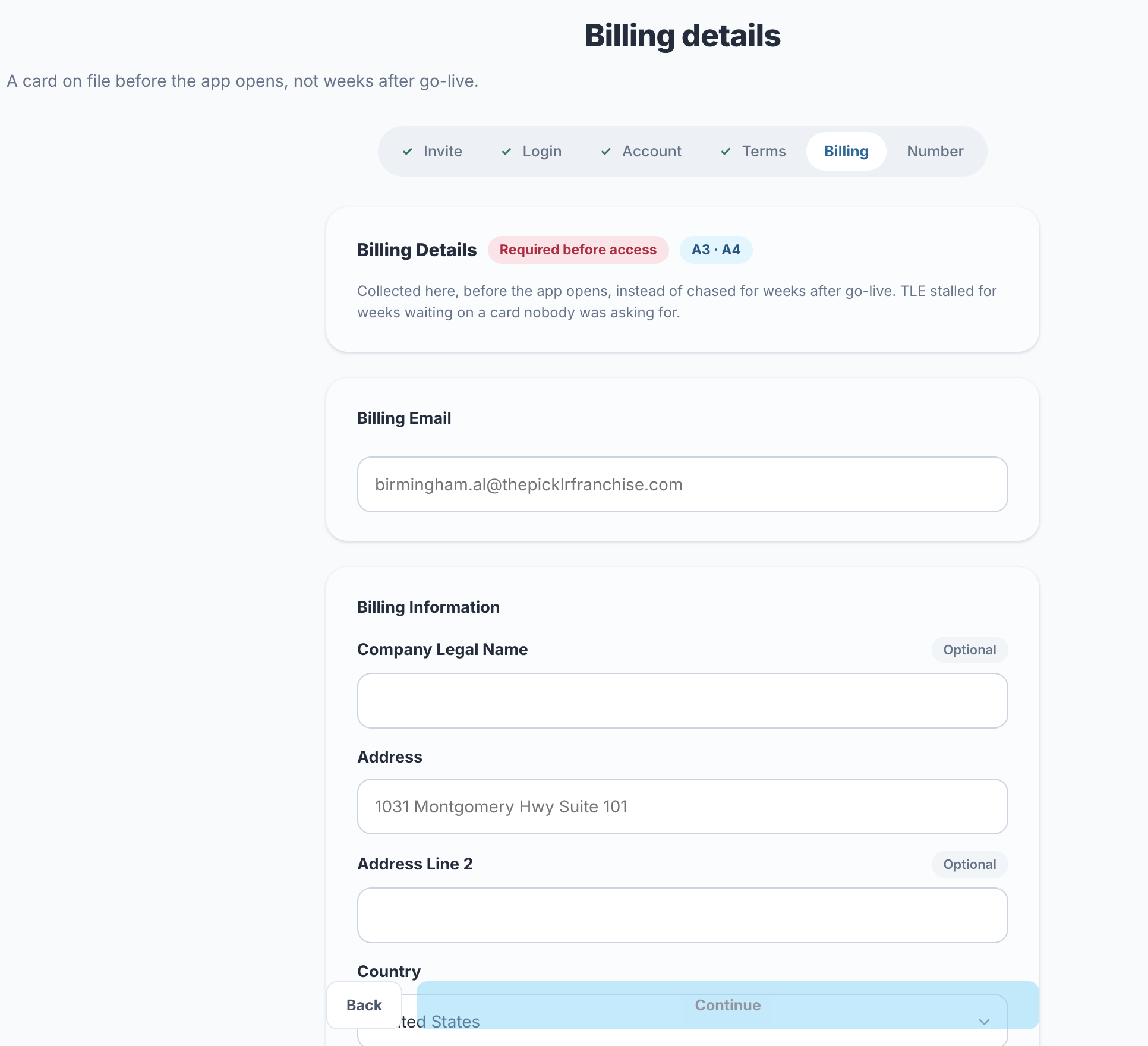
TLE stalled for weeks waiting on a card nobody was asking for.
Capture the card during self-serve signup, before it can become a blocker
① Self-serve signup
The preferred-vendor front door. The franchisee is already signed in.
Graham (see [[A8]])
Discovery is accidental. EWC dropped 23 centres mid-flow. Picklr Bluffdale and Lehigh went live and nobody told them.
A team-scoped registration link, emailed to the location, so signup attaches to the right Team on arrival
① Self-serve signup
Not a quick win — tokenized team-scoped invite links plus the email path make this a substantial build.
Nothing outstanding — this one is ready to spec.
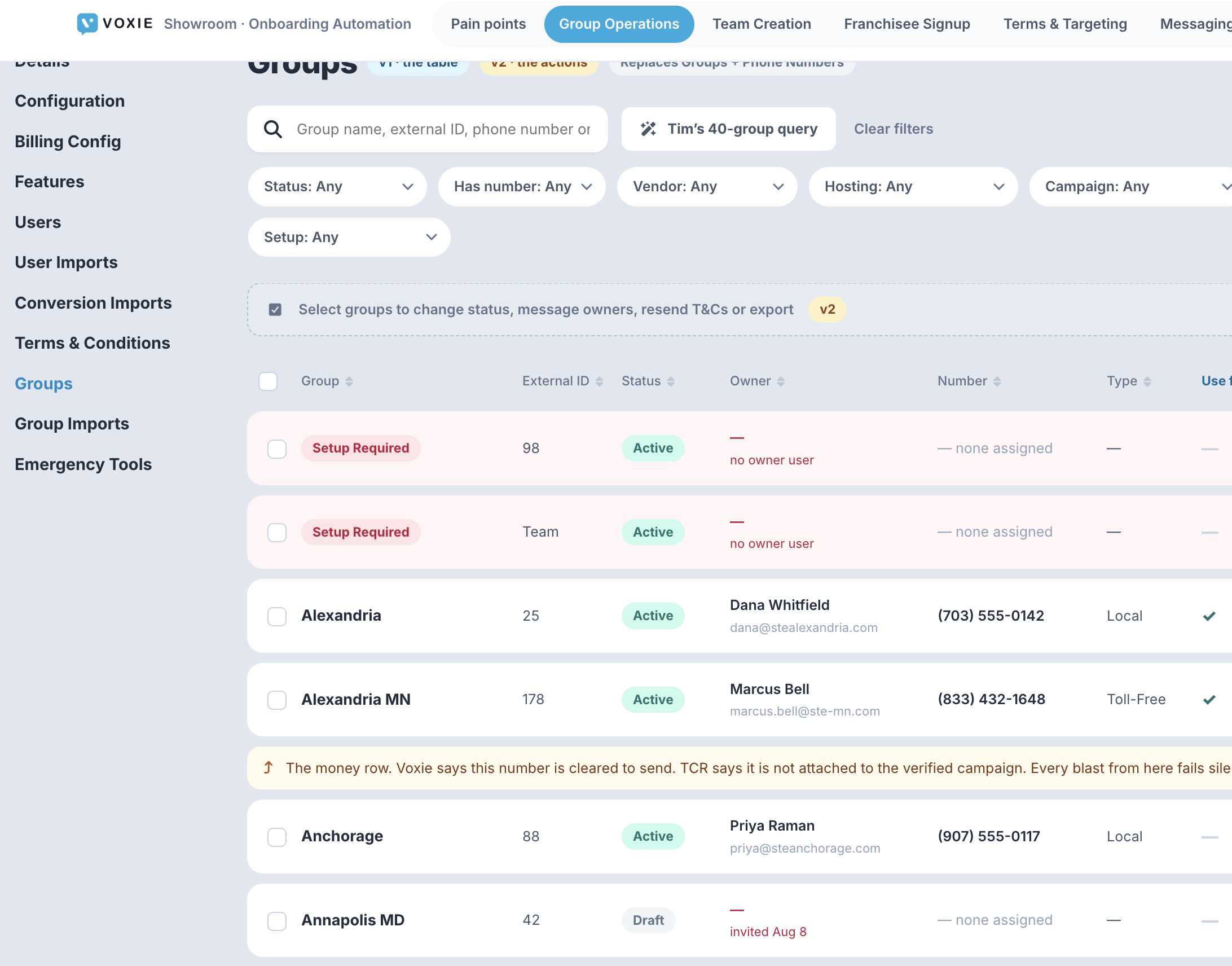
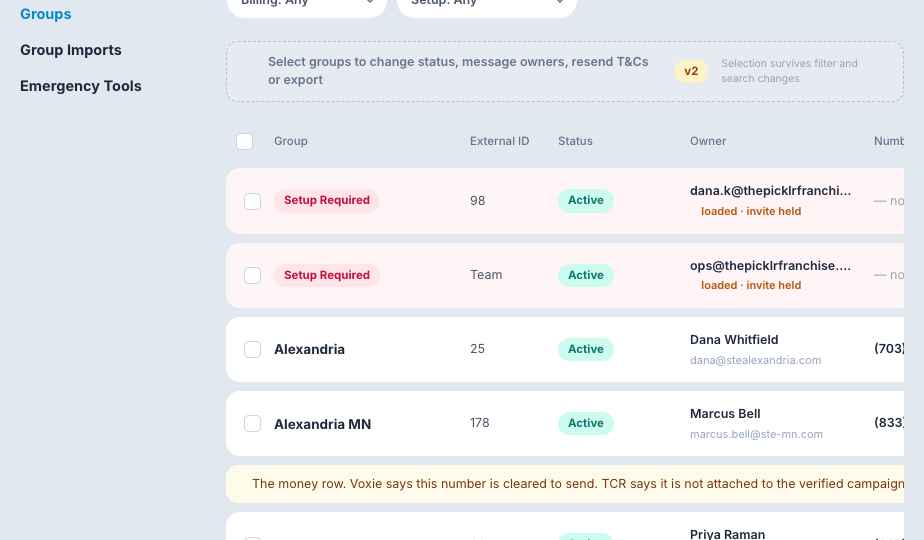
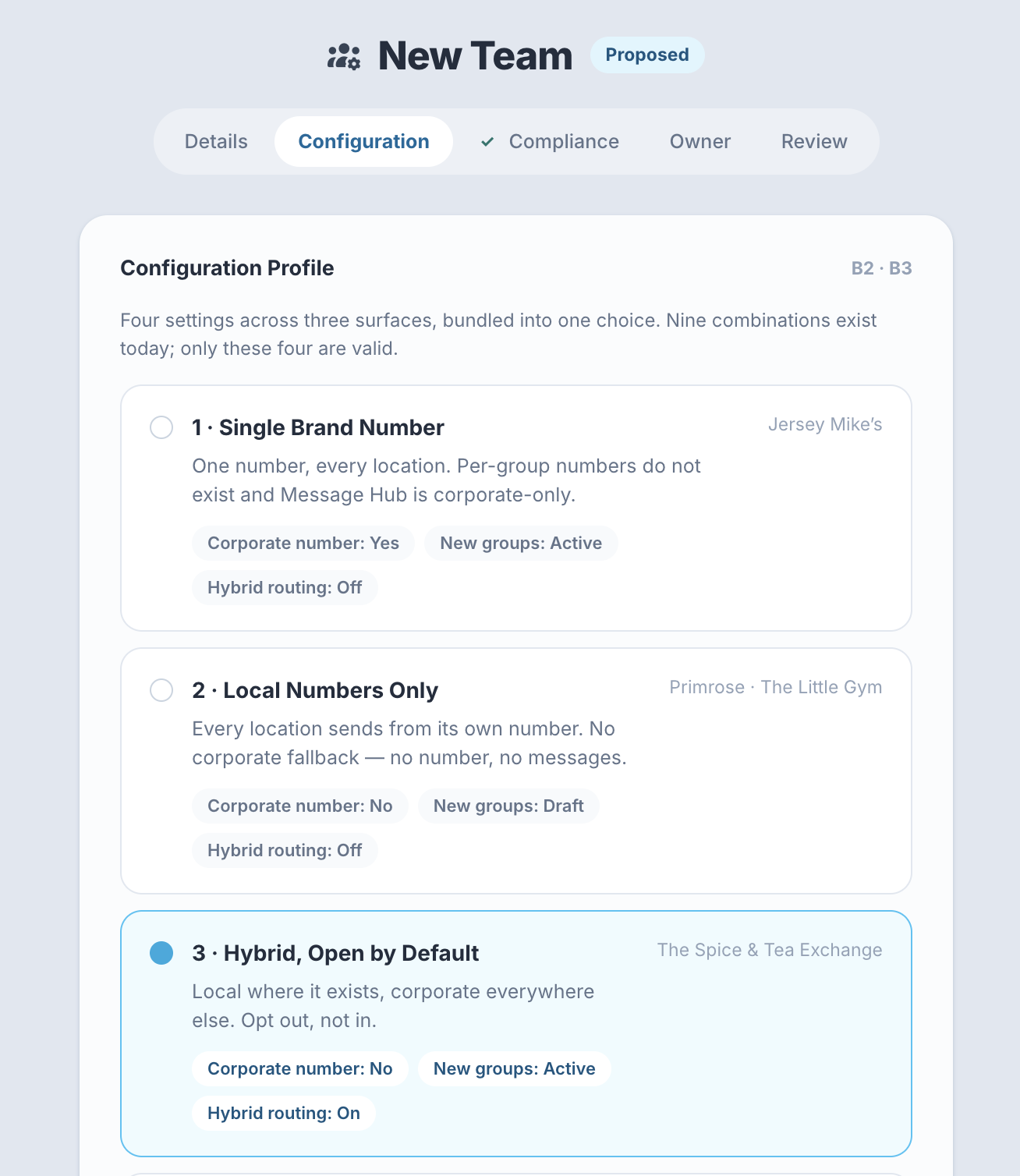
The Owner column on the Groups table, carrying the three states a signup can be in — signed up, invited and unanswered, or never asked — with the bulk actions that act on whichever set you select.
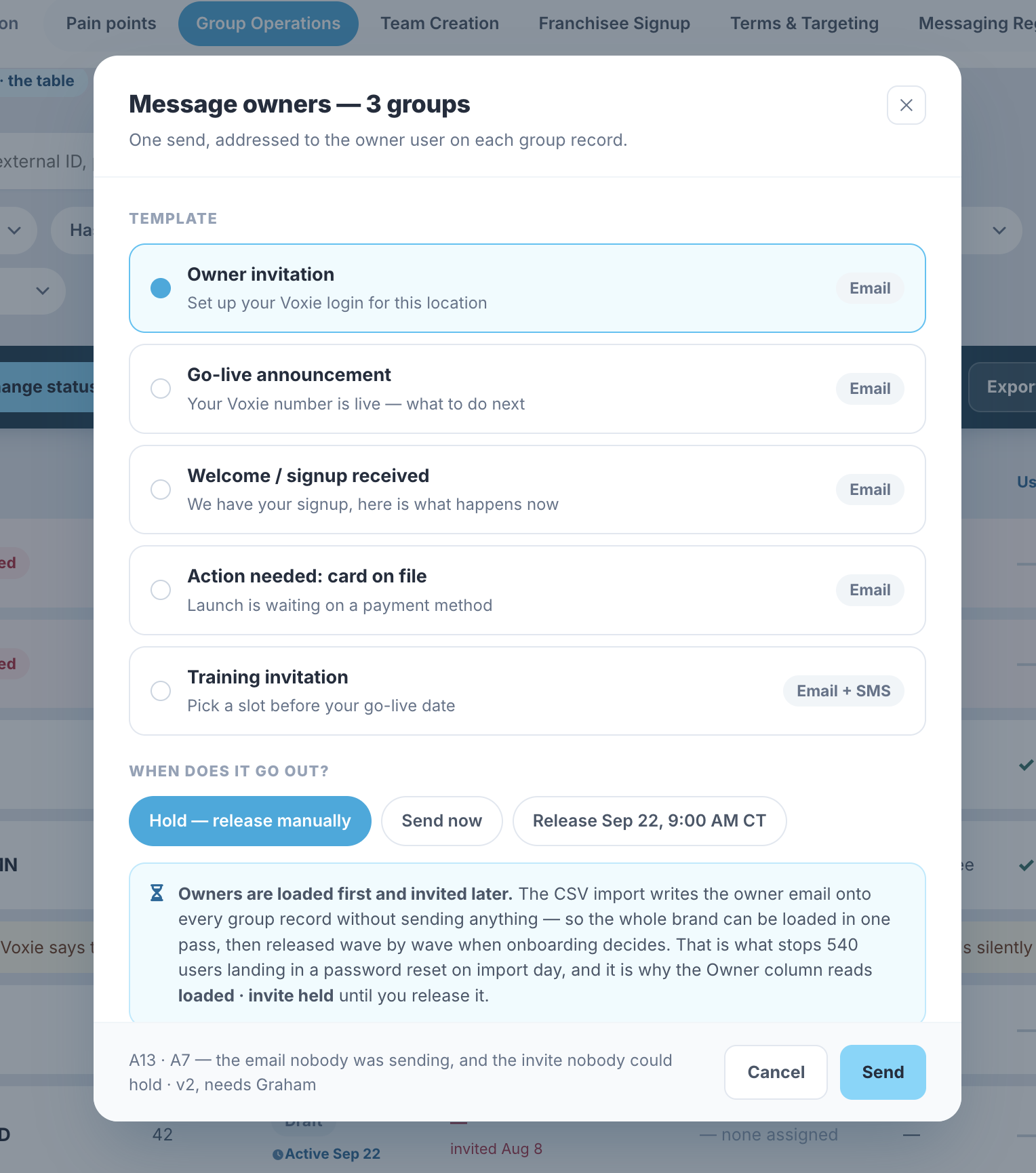
Invites suppressed because they can’t be scheduled; status invisible and not bulk-resendable. ~10 support tickets from one 540-user Victra import. 12+ "resend the invite" requests over 2.5 years.
A bulk Message Owners action — pick a template, send now or schedule it to fire with the wave
Both front doors
Self-serve covers hand-raisers. Waves still need staged invites.
Shane + Jean
The Groups table carrying invite state per group — loaded with the invite held, invited and unanswered, or never asked — next to the scheduled status legend on rows with a pending flip. Message owners is the control: hold and release manually, send now, or release on a date.
Changeable only via the SFTP transformer. CSMs cannot self-serve. Hits 100% of QSR brands on Franchise Hub.
In-product attribute editing, with bulk apply from the Group Operations page
② Group Operations page
Per-group editing and bulk apply are the same surface.
Nothing outstanding — this one is ready to spec.
47 of 63 Picklr numbers came back "Unable to Host." ~$6,300 in goodwill credits, 25+ Twilio threads. The reason a wave desynchronizes.
The longest and least predictable step.On hosting, Kyle’s appendix
One intake form that branches on how the number is acquired, checks host-ability before asking anything else, and captures the signer’s authority
Both front doors
Same component, two entry points: the franchisee at signup, or onboarding on their behalf from the group record.
Tim — confirm before the session
The status columns on the Groups table. Hosting and Campaign are read per group and hover for the full value, so an unhostable number or an unverified campaign is visible on the row rather than arriving in a carrier thread weeks later.
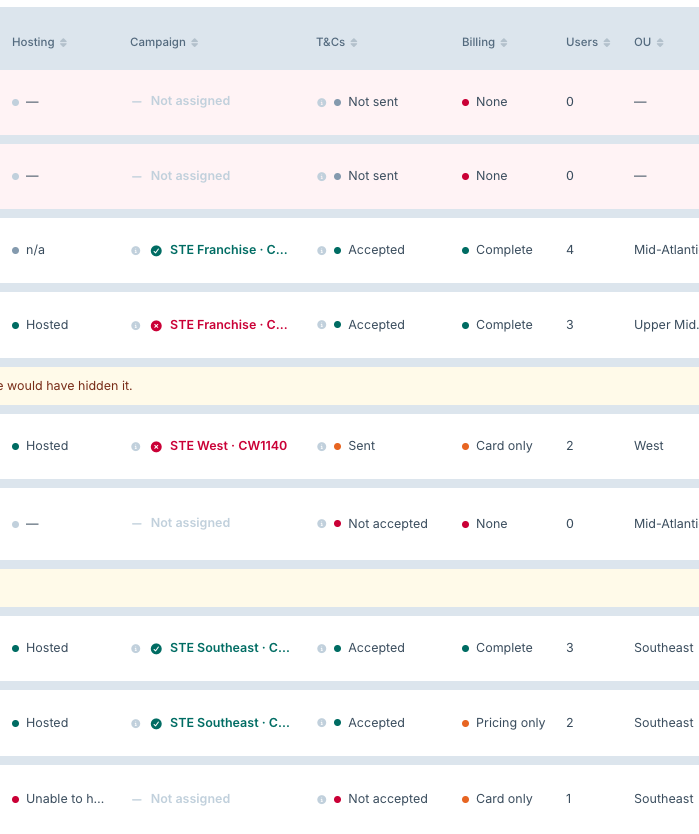
Nine combinations, four valid. At least one production team currently holds an invalid combination.
Configuration Profile selector — pick one of four by name, and the settings follow
Team creation checklist
Also the home for B2.
Nothing outstanding — this one is ready to spec.
Done via OnePass, easy to forget, and traffic gets flagged without one. "You just got to know you got to do that."
You just got to know you got to do that.Kyle Daniel
Search and buy in-product via the Cloudflare Registrar API
Team creation checklist
One-time per brand, and currently invisible until it bites.
Nothing outstanding — this one is ready to spec.
One document applies to every Group. Primrose wants in-app signing for new owners without making hundreds of DocuSign signatories re-sign — and today there is no way to express that.
Wave 1’s acceptance stays valid and frozen against the document they actually signed.Seba, Aug 12
Let a document target a subset of Groups, and let more than one document be active at once — legacy acceptances stay frozen against what was actually signed
Team creation checklist
Franchise Hub only. Legacy Teams migrate first. Builds on the Draft/Active/Paused/Archived lifecycle already being scoped.
Lucas — feasibility; Kelsey + Shane + Seba on the model
~60 Picklr locations frozen because the master file held generic emails, not human owners. No admin kill switch, no "Not Accepted" export.
Kill switch plus export — and self-serve signup fixes the root cause
Both front doors
The kill switch is remediation. The form is prevention.
Nothing outstanding — this one is ready to spec.
No paste-a-list. Makes TLE (450+), EWC (150 at a time) and Primrose (600) unworkable by hand.
Define collections by group custom attribute instead of a hand-picked list — an attribute-defined collection has no ceiling
Everything sent by hand, one location at a time: 18 byte-identical emails, 5 within 15 seconds. 11 launch notifications, 6 at the same timestamp.
Trigger Jean’s two templates on state change — both are already written
Both front doors
Fixes "went live and nobody told them" for both motions at once.
Nothing outstanding — this one is ready to spec.
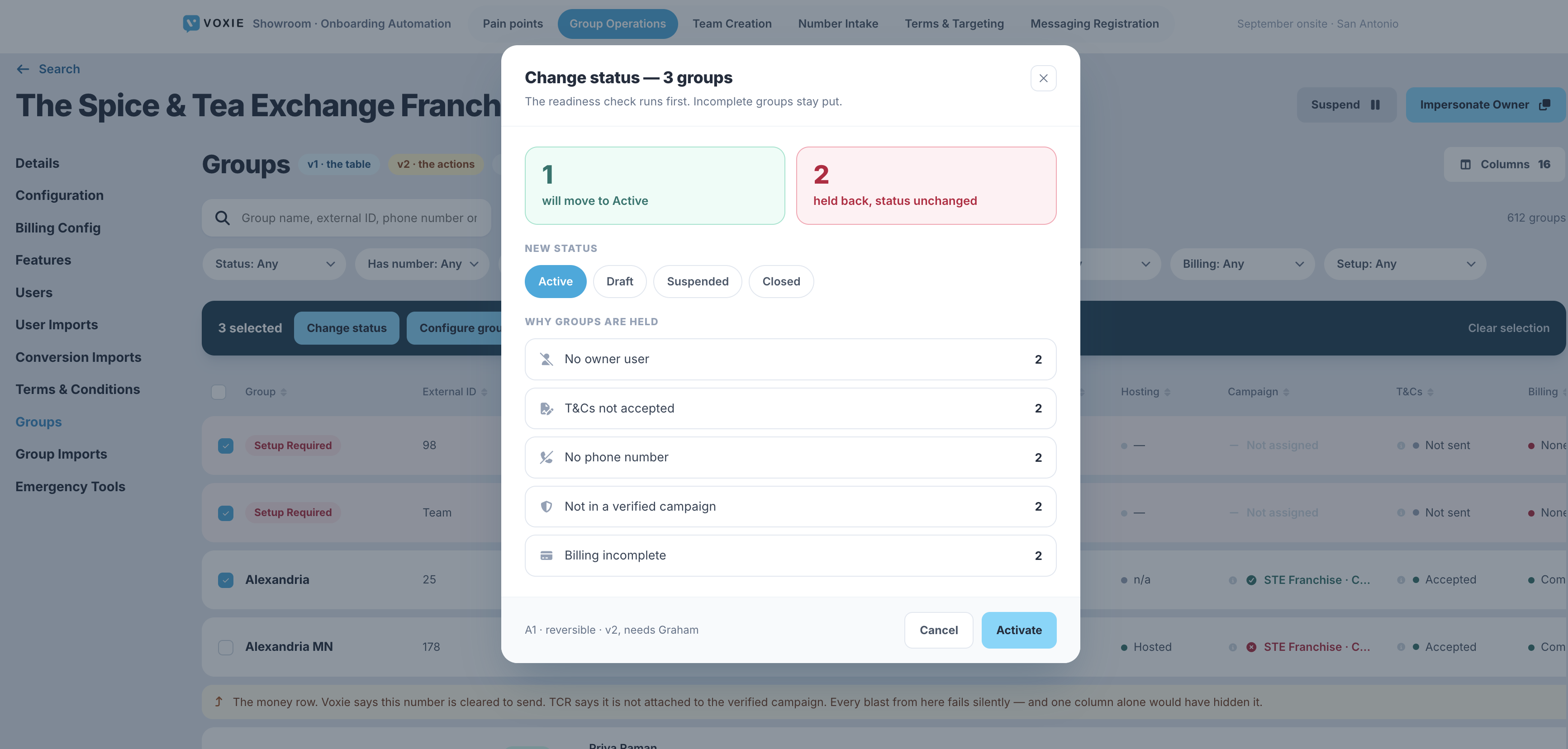
Groups go live incomplete, and the failures are customer-visible.
A readiness check that gates the bulk activate — nothing flips live until it passes
Group Operations page
The headline column. Read-only in v1 — it reports, it does not gate.
Nothing outstanding — this one is ready to spec.
The Groups table as the decision surface. Every readiness signal is a column on the row and a filter above it, so onboarding can isolate any permutation — hosted but not on a verified campaign, cleared to send with no T&Cs, a number assigned but billing incomplete — and then flip only that set. The Change status action re-runs the same check on submit and holds back anything that still fails, naming the reason.
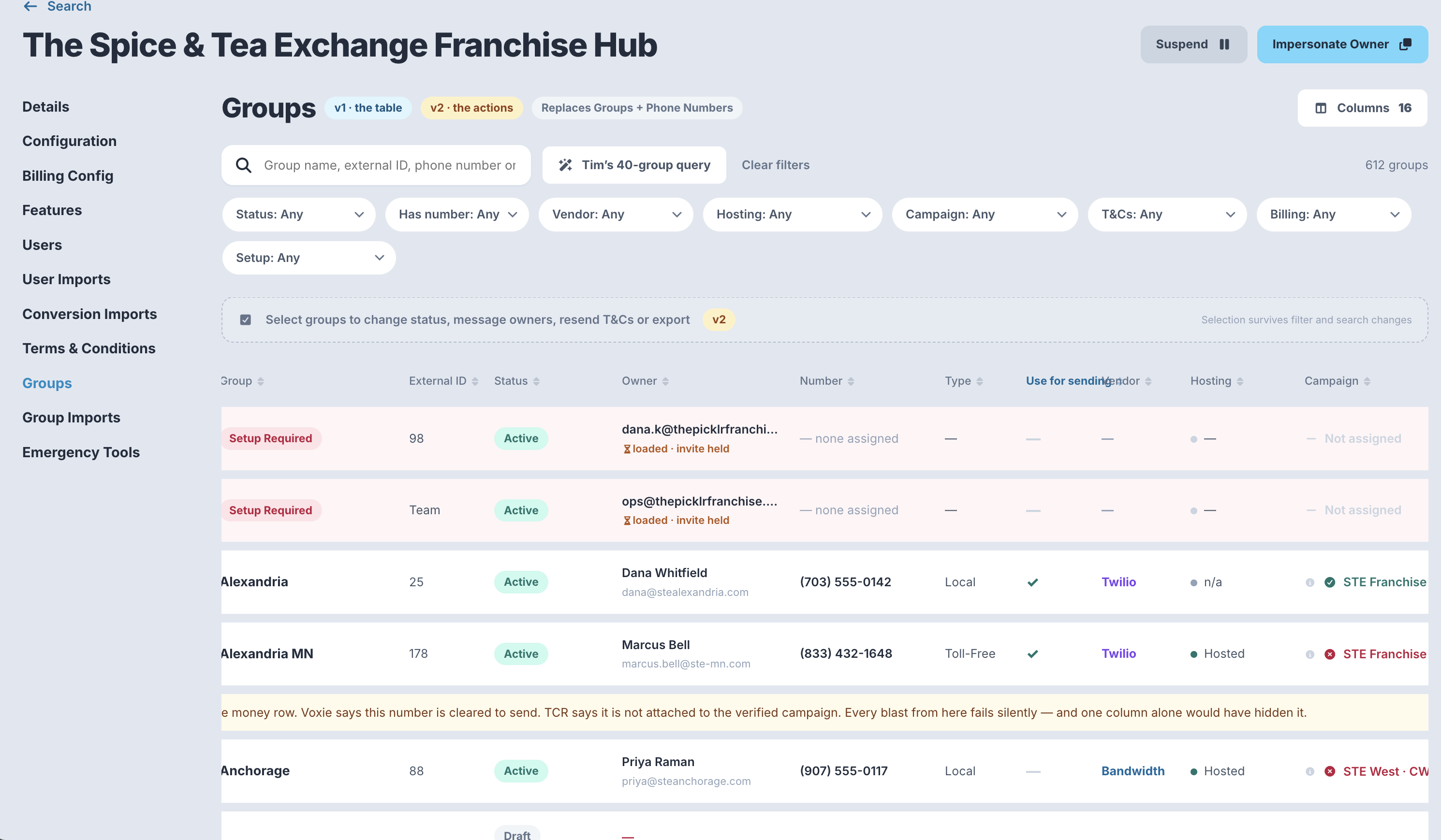
Six trackers, hand-maintained per brand. Eight Notion pages exist only to say "go update the tracker."
The ops page retires them. One row per group, live, instead of six hand-maintained trackers
Group Operations page
Also absorbs Kelsey’s billing cockpit — budget already allocated later in the year.
Lucas — in grooming
The root cause of the A1 status mess. Bulk import silently defaults every group to Active because of it.
Oh no, I did not know this.Kyle, when Seba showed him the setting
Surface it at team creation, inside the configuration profile selector
Team creation checklist
A Bucket B item causing a Bucket A problem. Pull it out of Priority 2.
Nothing outstanding — this one is ready to spec.
The default group status stops being a setting anyone has to find. It is implied by the use case chosen at team creation and shown on the profile card — Single Brand Number and Hybrid, Open by Default imply Active; Local Numbers Only and Hybrid, Activate to Send imply Draft. Named against a real brand, so the choice is recognisable rather than abstract.
Enrolment into collections is manual, per group. Every activation needs a second manual step.
Deferred. Active auto-enrolling into collections changes how the platform behaves — that is Graham, and Aug 10 ruled it out of the sprint
Onsite discussion
The ops page makes the missing enrolment visible in the meantime.
Seba + Graham
Nothing to build in September. If the room wants it specced, the artefact is a brand-level mapping model — not a screen.
Duplicates inflate group counts — and counts drive billing. Missed activations hide in the same gap.
The phone number is the duplicate key. The intake form looks it up in Voxie before the carrier check, so a duplicate is caught before the Group exists
① Self-serve signup
Cheap, and billing accuracy depends on it — duplicates make the Group count disagree with the invoice.
Kyle
The registry card below in all three states — clear, near match, exact match with the routing hand-off. It sits above the carrier check because finding a duplicate should cost one field, not twelve.
Breaks CRM and billing linkage downstream, and it is discovered late.
Required-field validation at team creation
Team creation checklist
Bucket B is a checklist problem. This is one line of it.
Nothing outstanding — this one is ready to spec.
The HubSpot Company ID field at team creation — required, format-validated, and showing a verified state once it resolves against a real company.
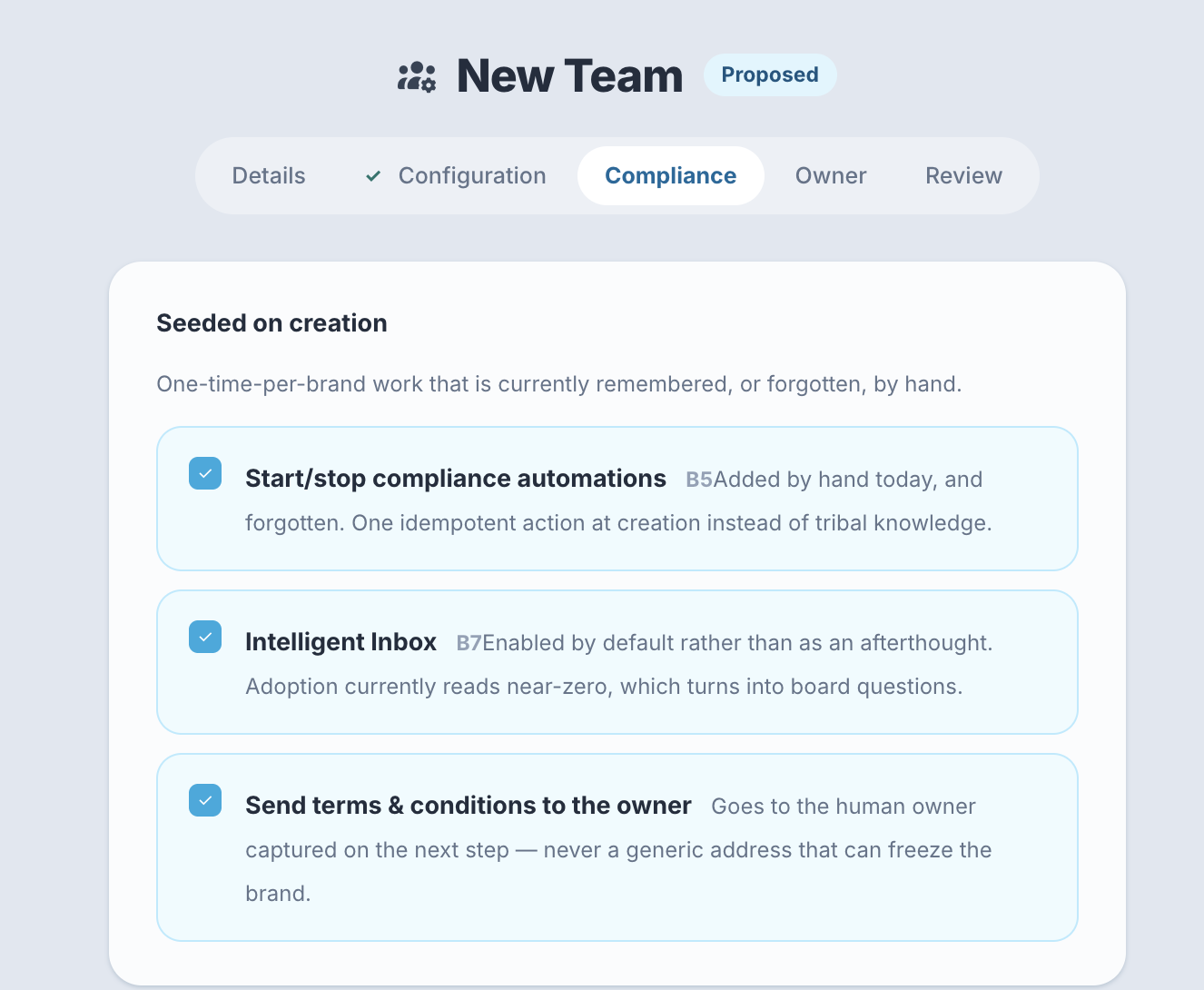
Start/stop compliance automations are added by hand. One-time work, but forgotten.
A button in Kiosk that could add the compliance automations.Tim, Aug 4
Seed the compliance automations as a step in New Team set-up, not a button someone has to remember
New Team set-up
Days of work. Removes a recurring one-time-per-brand chore.
Nothing outstanding — this one is ready to spec.
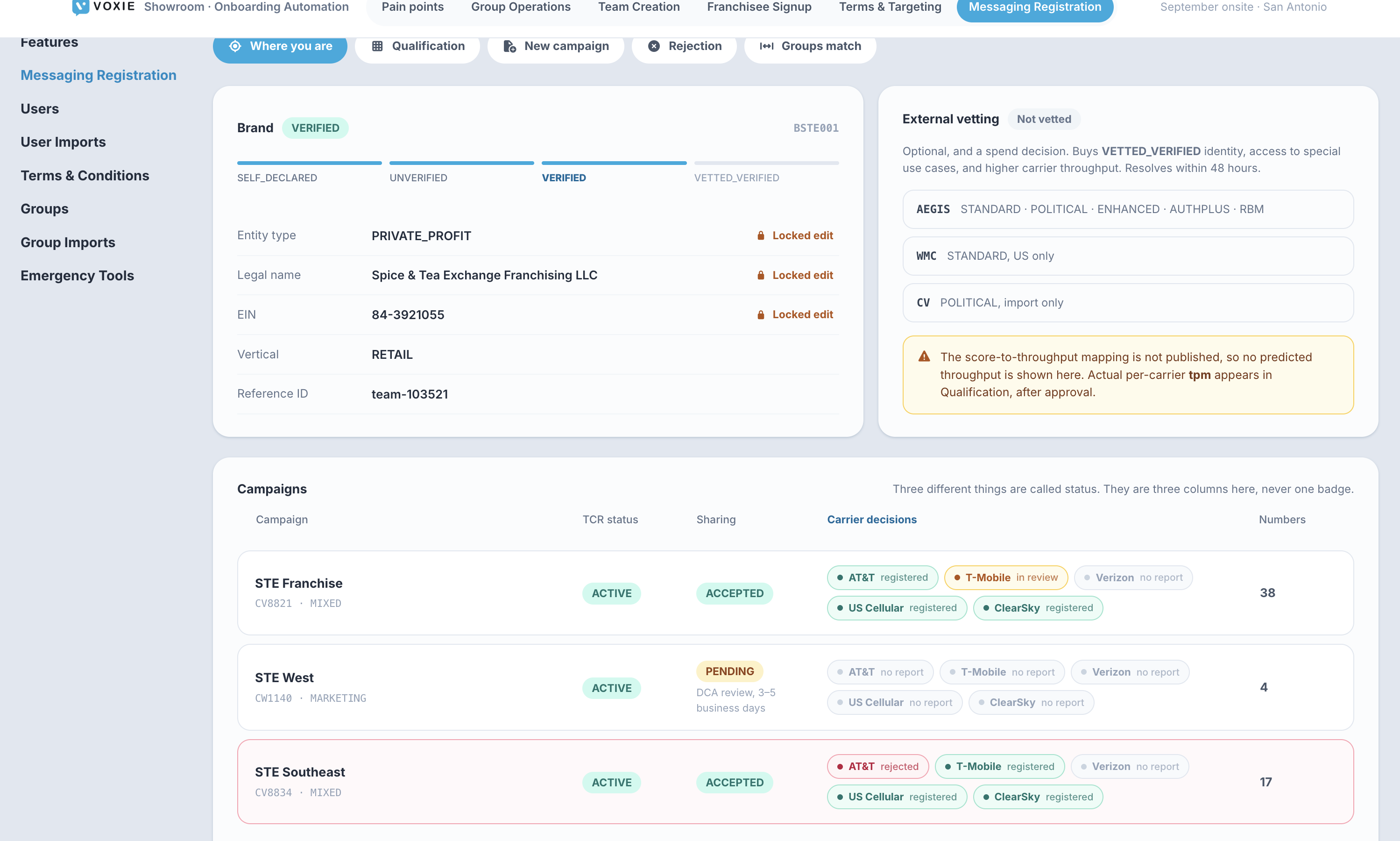
~10 rejection events across 8 customers in 12 months, and we are losing Twilio FastTrack support.
Submit to TCR directly from Kiosk, with the Messaging Registration skill running inline as pre-validation — registration is per brand and one-off, so it is not blocked by the Bandwidth timeline
Team creation checklist
v1 is pure API reads and genuinely Lucas-shaped. It also feeds the Groups page Campaign and In campaign columns directly.
Lucas — September feasibility
The prototype: brand identity and vetting state, every campaign with its TCR status, DCA sharing and per-carrier decisions kept as three separate fields, the qualification table, inline pre-validation before submit, the rejection and remediation path, and the reconciliation against the Groups page Campaign column.
Adoption reads near-zero, which turns into board questions.
Make AI enablement a default go-live step
Team creation checklist
Process only. The board is already asking about adoption.
Nothing outstanding — this one is ready to spec.
The Compliance step at team creation, where Intelligent Inbox is enabled by default rather than left as an afterthought.
Gates A3 and A4 entirely, which means it gates the whole self-serve front door.
It appears to be a deliberate block… we need to ask Graham why this is not allowed.Tim, Aug 4
Unblock Owner provisioning — the answer is needed before anything else is specced
Blocks front door ①
A hand-raiser who adds a card must be an Owner. There is no way around it.
Graham — before the onsite
Nothing to draw until the answer lands. Two branches to design against: Owner-at-signup, or a delegated payment path.
Caps how many locations can go live at once regardless of platform capability — "the real limiter on wave size."
Training doesn’t scale, and it’s the real limiter on wave size.Kyle Daniel
Self-serve training signup in the same form. Delivery model goes to the CS session
① Self-serve signup
The cheap hedge. If training really is the cap, neither front door raises the ceiling.
Nothing outstanding — this one is ready to spec.
Not designed yet. The artefact would be a slot picker in the signup form plus the capacity view an operator plans a wave against.